Cart-based bot protection requires modifications to a shop's Liquid theme code. The required modifications are relatively simple, but if you are not comfortable editing your theme code, you should seek the assistance of a Shopify store developer.
The required modifications change the behavior of a store's cart page. That page will initially hide the checkout button. Instead, a button labeled "Click here to verify you are human" is shown. Clicking on that button does two things:
1. It adds a hidden property to each line item. This new line-item property, "_checkout_method," is set to have a value of "verified_human."
2. It shows the customer that they have been verified and displays the normal checkout button.
In addition, you must remove any "Buy it now" buttons from your product pages so that all customers must go through the cart page to reach checkout. Removing those "Buy it now" buttons does not require changes to code; you can readily make this change using your store admin.
To remove "Buy it now" buttons from product pages:
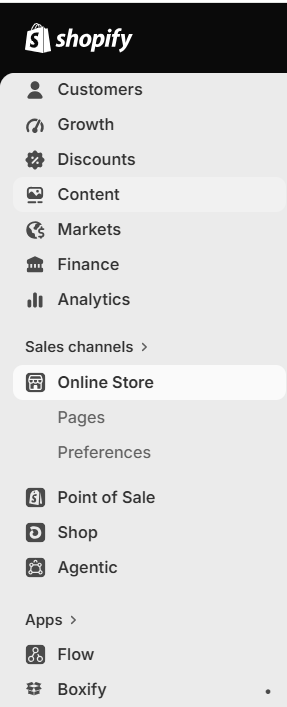
1. Click on "Online store" in the vertical navigation panel at the left in your store admin:
2. Click on "Edit theme" in the page that appears:

3. Click on the drop-down menu at the top (which will say "Home page") and go to your default-product page. (If your theme has different sorts of product pages, you'll need to make this change to each one.):

4. After you have the relevant product page loaded, click on the "Buy buttons" section, which then gets highlighted:
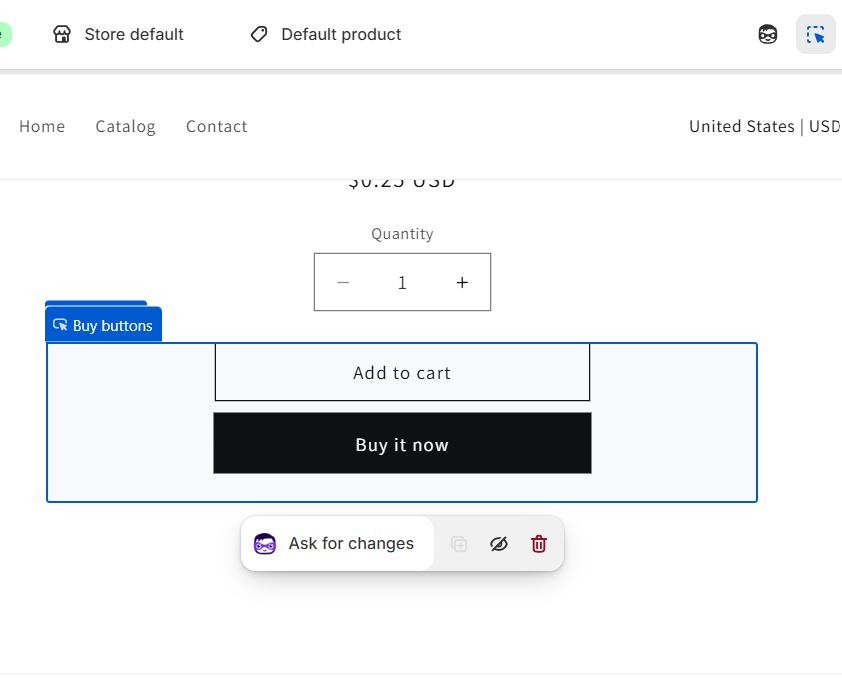
5. That action brings up settings controls at the left. Switch off "Show dynamic checkout buttons":
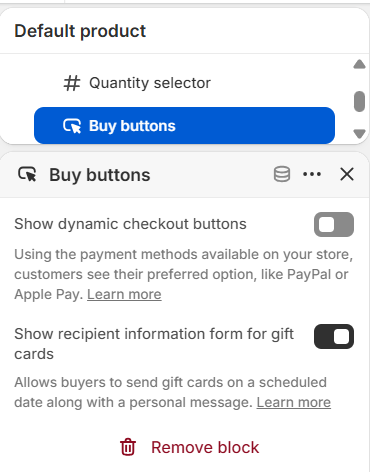
With that setting toggled off, the "Buy it now" button goes away, leaving only the "Add to cart" button.
As a courtesy to those users who are comfortable editing the Liquid code in their shop themes, we provide some example code below. Please understand that this code may or may not work with your particular theme. Boxify is not in a position to support theme modifications, so if you are not comfortable making these changes to the Liquid code of your cart page yourself, you should seek the help of a Shopify theme developer or similar consultant to help you implement the needed code changes for your particular shop.